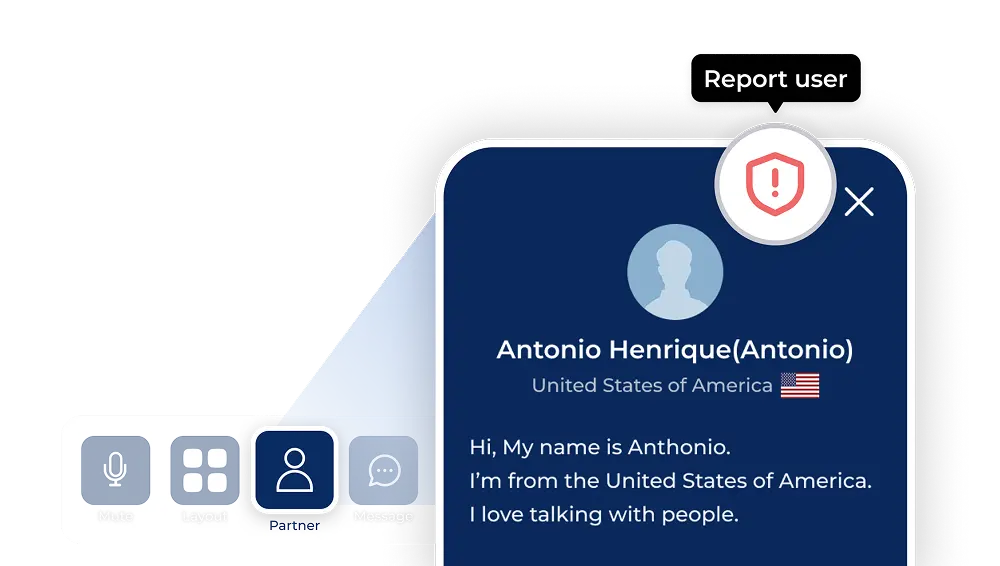
How can I report my partner if they violate Episoden guidelines or behave in a way that makes it difficult to continue the conversation?
If you feel uncomfortable due to your partner’s behavior during a conversation, you can report the partner using the Report feature available in the conversation room.
To maintain a safe and pleasant conversation environment, Episoden takes appropriate action when behavior that violates our guidelines is detected. If our system does not recognize the issue immediately, a report allows the system to review the partner’s behavior and take the necessary action.
Reports apply only to the specific conversation room in which the report is submitted.
Reasons for reporting
- Lying down
- Background noise
- Video or connection issue
- Moving or shaking a lot
- Face not clearly visible
- Multiple people on screen
- Sexual harassment
- Asks for phone/SNS
- Others
How to report
- 1.Click the Partner button on the conversation room screen.
- 2.Click the Report icon in the partner information pop-up.
- 3.Select the reason for reporting and click the Report button.